3 Best BSC Airdrop Tools: Fees and Safety Checks
Compare three BSC airdrop tools for bulk token transfers. Check fees, CSV inputs, approvals, failed batches, and recipient records before you send.

DeFi Farmer Research Desk
Sep 8, 2026 · 12 min read
In brief. I would start with Smithii for recipient checks: it caught a bad address and a duplicate before wallet connection. 20lab has clear totals. Multisender Classic separates preparation, approval, and sending. Compare final costs before signing.
On this page10 sections
The best BSC airdrop tools on this shortlist are Smithii, 20lab, and Multisender.app. I would start with Smithii for recipient-list checks. It flagged a bad address and a duplicate before wallet connection. 20lab has a clear total preview. Multisender Classic separates preparation, approval, and sending. The cheapest choice depends on your token, recipient count, and final quote.
These tools send tokens you already hold to many addresses. They do not find free tokens for you. For that different task, read what airdrop farming means.
Last checked September 8, 2026, with example recipient lists. No wallet was connected and no tokens were sent.
Compare the Three Tools
| Tool | Best fit in this shortlist | Input and workflow | Published fee basis | Main limit |
|---|---|---|---|---|
| 20lab | Simple list totals | Equal or different amounts; CSV or TXT, up to 2 MB | Per recipient; obtain the current quote | Disconnected editor counted duplicate rows without a warning |
| Multisender.app | Teams that want documented checks before sending | Product describes validation, simulation, and cost review | Per batch; varies with the job | Confirm the checks and contract for your selected chain |
| Smithii | Our pick for list checks | Flagged bad addresses and duplicates; removal control worked | Listed at 0.0005 BNB per wallet, plus gas | Duplicate removal discarded the second amount, not merged it |
These are task-based choices, not audit grades. We did not compare live signed quotes for the same distribution. A tool with a lower service fee can cost more overall.
1. 20lab: A Clear Form for a Simple Distribution
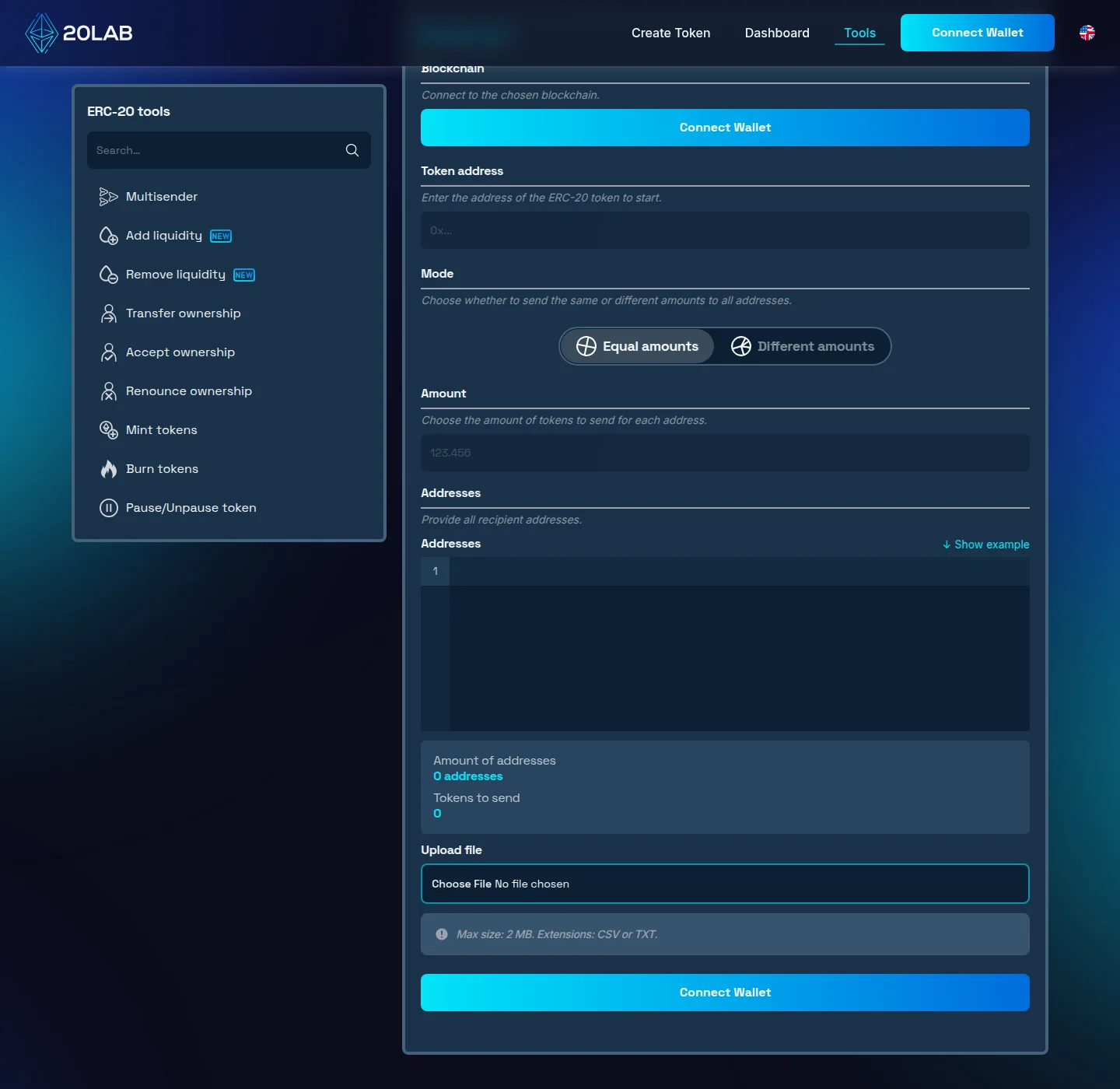
In Different amounts mode, Show example loaded three rows totaling 2.17 tokens. The row count and total were easy to check together. Token selection and the equal-amount field required a wallet connection, but the recipient editor worked without one.
The list checks were less helpful. We entered not-an-address, 1. The disconnected editor showed one address and a total of one, without an address warning. Two rows with the same synthetic address then showed two addresses and a total of three. That counter counts rows; it did not establish unique, valid recipients. We did not test later validation before signing.
The maker documents automatic batching and a progress view with transaction hashes. Its fee is per recipient, but we did not obtain a live amount. 20lab form and documentation
I would use 20lab to check the arithmetic, not to clean a recipient list. Smithii gave clearer feedback on bad data. With 20lab, check the file yourself before trusting the displayed total.
Suppose you plan to send 10 project tokens to each of 25 members. Your total should be 250. Check that number before you review fees. If the form shows 2,500, stop and correct the input.
2. Multisender.app: Clear Steps Before Sending
In Classic Multisender, switching to BNB Smart Chain kept Prepare, Approve, and Multisend as separate steps. Show Sample CSV opened address-and-amount rows without a header. A Deflationary checkbox sat beside token selection. Classic app
I like the separate steps, but the sample needs work. It included an .eth name even with BSC selected. That does not prove name resolution works for your BSC transfer. Use verified full addresses unless that support is confirmed. The advertised checks alone would not put Multisender above Smithii for list validation.
Multisender.app describes a sequence that parses recipients, checks duplicates, validates addresses, checks balances and allowances, and simulates the transaction. It also describes a fee review before signing. These are useful features to request when a distribution has many rows. Published workflow
Its FAQ describes a per-batch service fee. A membership may remove that service fee; it does not remove blockchain gas. Confirm whether membership makes sense for your actual number of campaigns. The BNB Chain directory listing provides an additional route to identify the product, not a safety guarantee.
For a team distribution, compare those checks with your own approval process. A successful simulation does not guarantee later execution. The token state, allowance, or network conditions can change before confirmation.
For example, one person prepares 800 reward entries. A second person checks the file, total, and duplicate policy. The signer checks the same totals before approval. The tool does not replace that second review.
3. Smithii: The Clearest Recipient Warnings
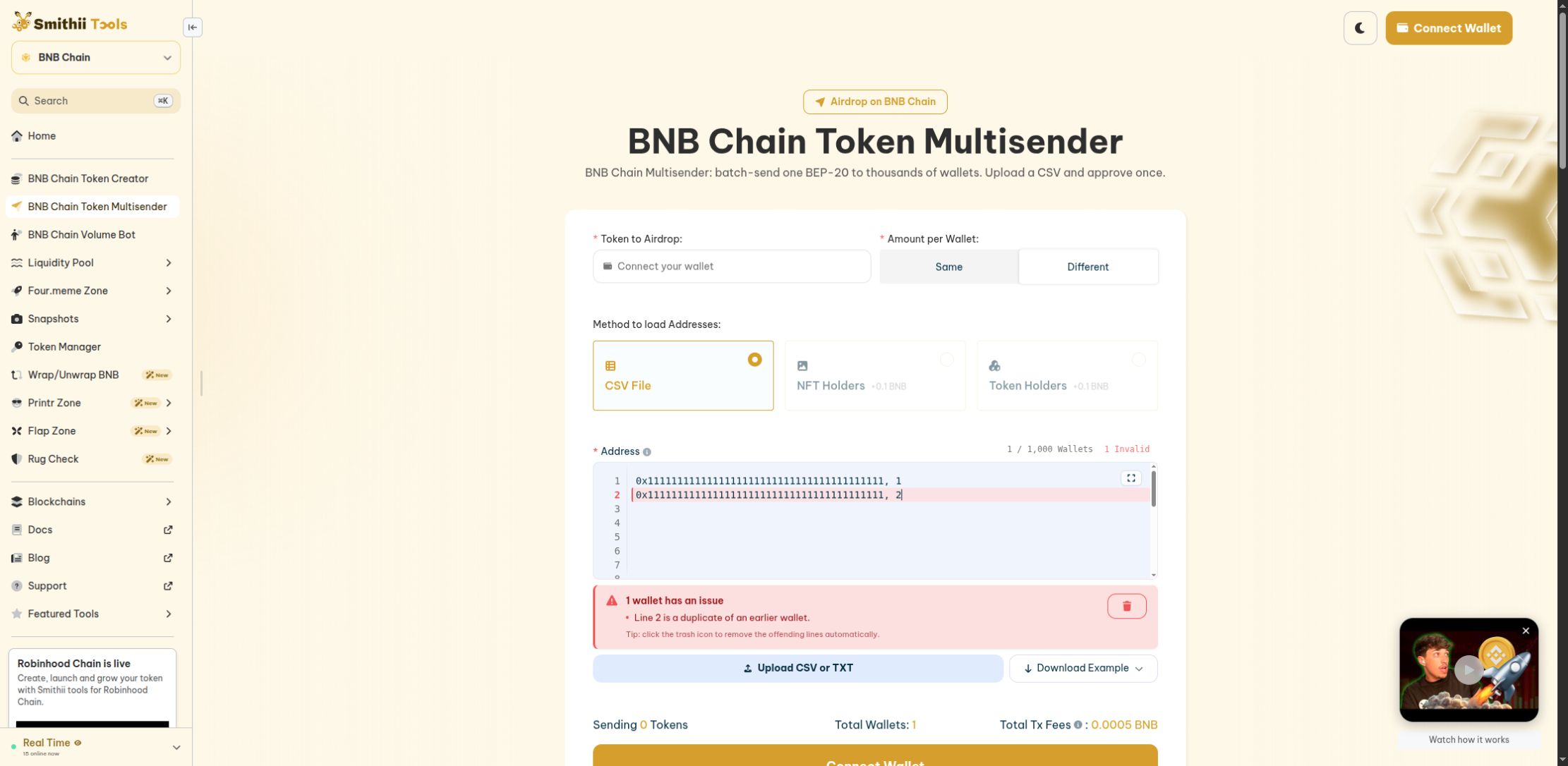
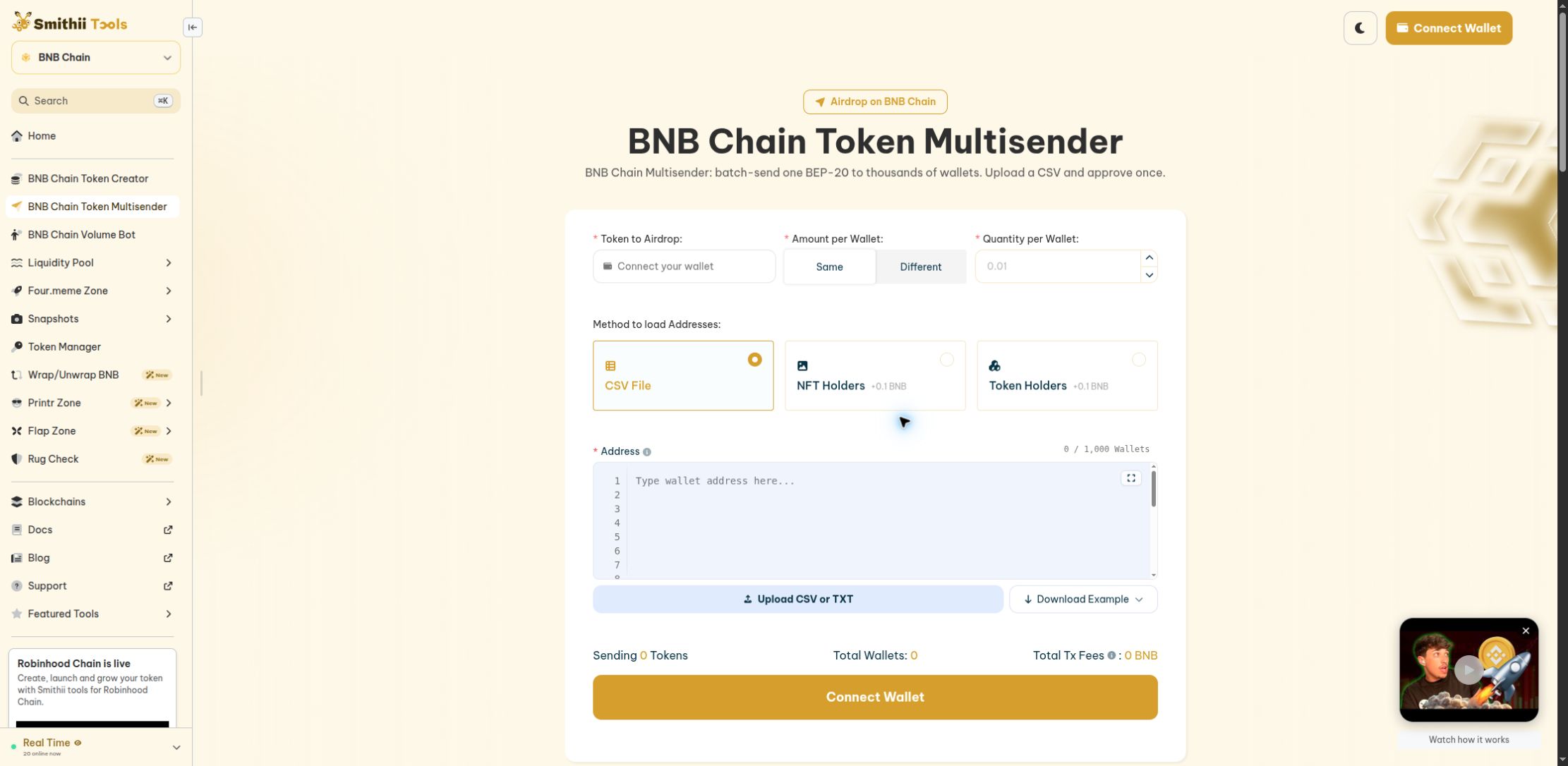
Smithii gave the clearest immediate warnings of the three tools. In Different mode, not-an-address, 1 produced an invalid EVM address warning for line one. Two rows with the same example address produced a duplicate warning for line two. The summary counted one wallet and showed a 0.0005 BNB fee.
Selecting Delete invalid wallets removed the second row and kept the first row's amount. That helps with accidental duplicates, but it does not combine two awards. Merge intentional awards yourself before import. The token total remained zero without token selection, so that screen was not a complete distribution quote.
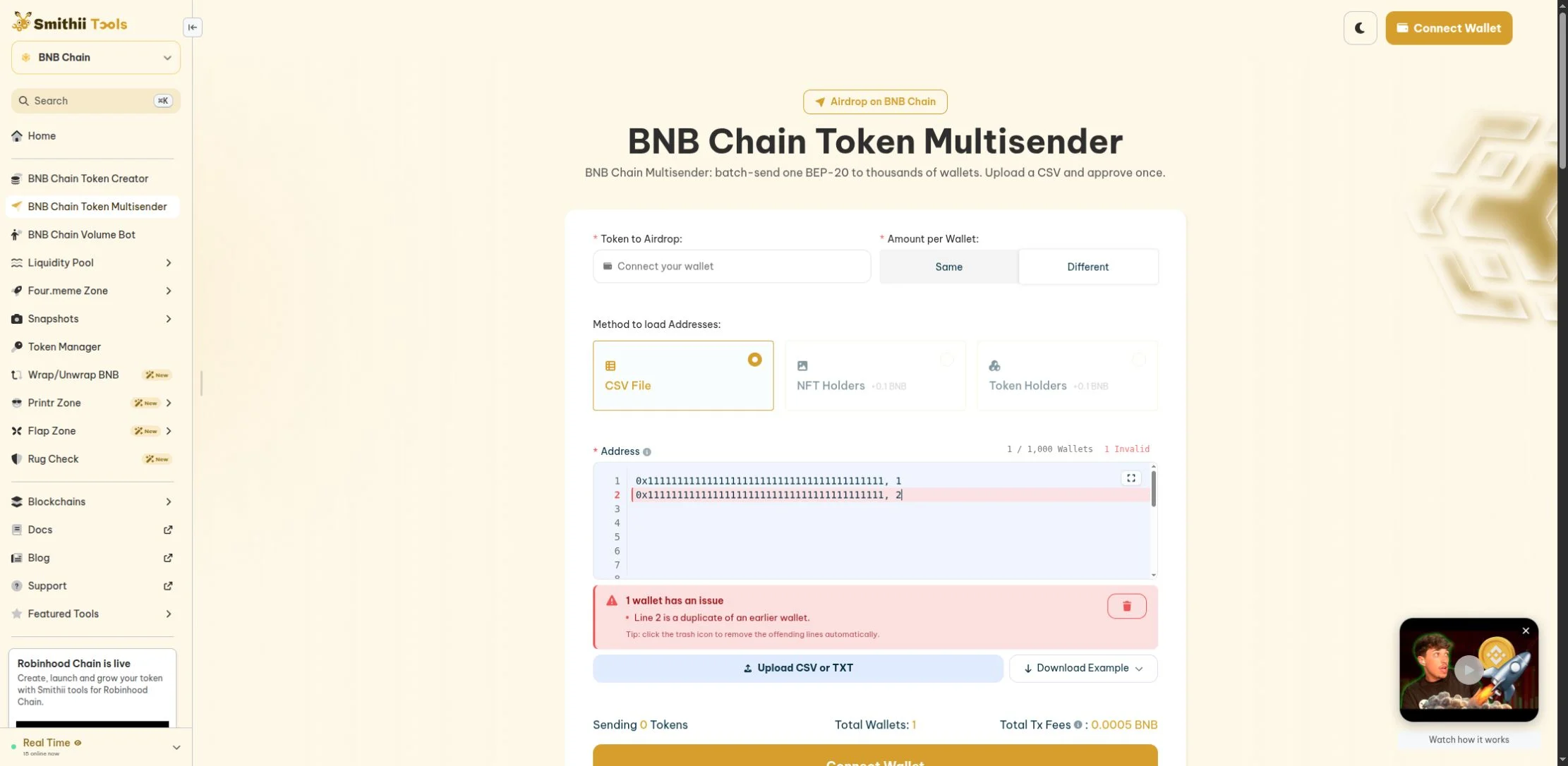
Open the full-size duplicate-check screenshot.
Smithii's BSC page lists 0.0005 BNB per wallet plus gas. It accepts an address and amount per row, by paste or file upload. Its instructions say a header row is not required. Check the example in the current form before exporting your spreadsheet. Smithii BSC tool
The NFT Holders and Token Holders import options each showed +0.1 BNB. That extra cost is easy to miss if you compare only the base rate. We did not test the advertised throughput or match its advertised audit to a deployed contract.
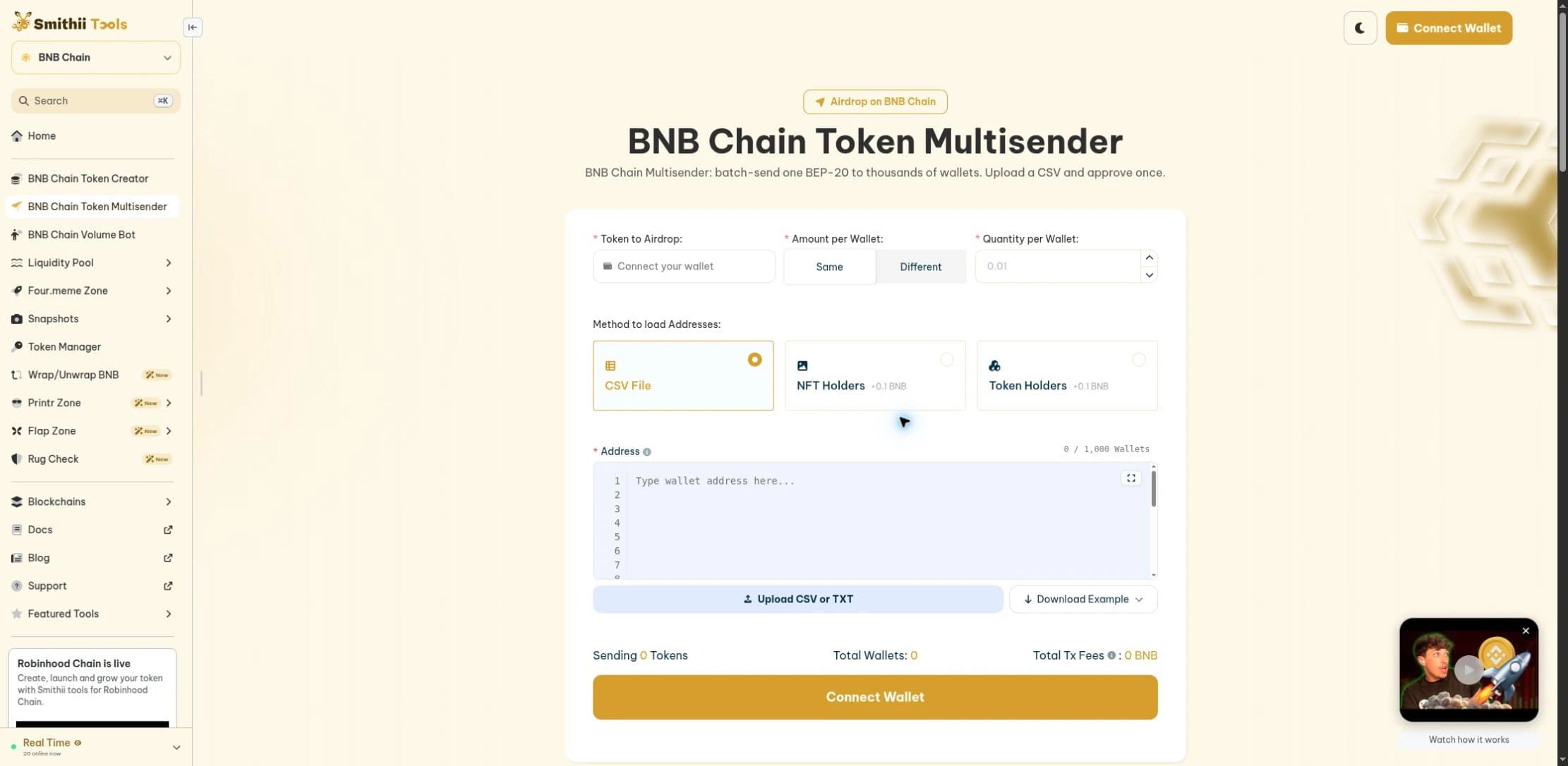
Open the full-size Smithii screenshot.
Smithii would be my first choice for cleaning a recipient list. A warning that names the bad row is more useful than a counter. But the per-wallet fee adds up. For 1,000 wallets, the listed base fee is 0.5 BNB before gas or extras. I would compare quotes before using it for a large campaign.
View as table
| Recipients | Base service fee |
|---|---|
| 100 wallets | 0.05 BNB |
| 500 wallets | 0.25 BNB |
| 1,000 wallets | 0.50 BNB |
Calculate the Full Cost
Use this budget structure before choosing a provider:
Distribution budget = tokens to recipients + transfer overhead
Transfer overhead = service fee + approval gas + batch gas + selected extras
Keep the units separate. A token balance and a BNB gas balance are not interchangeable. If you convert overhead to USD, record the BNB/USD rate and time. Our crypto converter can help with the arithmetic; it is not a sender quote.
Owning all 250 reward tokens is not enough. You also need BNB to approve and send them. Do not reduce recipient amounts without checking your stated campaign terms.
Compare quotes using the same token, recipient count, and amounts. Record service fees, batch count, and gas estimates separately. Budget for a failed attempt, but do not record that allowance as a fee already paid.
A batch size is not a fixed promise. Contract execution uses gas, and a transaction must fit the applicable limit. Complex transfer rules can reduce practical capacity. Ignore blanket claims that every token fits the same number of recipients.
Prepare the Recipient File
Use the format the selected tool shows. This non-runnable template explains the fields; replace placeholders only with addresses you have verified:
RECIPIENT_ADDRESS_A,10
RECIPIENT_ADDRESS_B,12.5
Do not upload that template as a real campaign. Keep a separate internal record of the person or account behind each address. Share only the data the sender needs.
| Check | Possible error | Correction |
|---|---|---|
| Network | An EVM address is accepted on the wrong chain | Confirm the recipient can receive this asset on BSC |
| Amount | A comma decimal becomes a new CSV column | Use the exact decimal format the tool expects |
| Precision | A token cannot represent the entered fraction | Confirm token decimals and round under an agreed policy |
| Duplicate rows | One address receives twice | Decide whether duplicates are errors or intentional awards |
| Recipient type | An exchange deposit address cannot credit the token | Obtain explicit asset and network support before sending |
| Token identity | A copied ticker points to another contract | Match the verified contract, not only the name |
For a public campaign, also document eligibility and how the list was produced. Our Sybil attack guide explains why one address does not necessarily mean one person.
Send, Check, and Reconcile
- 01
Review
Confirm network, token, recipient list, and totals.
- 02
Test
Use a small authorized test and check the received amount.
- 03
Approve
Review the spender, amount, and total quote.
- 04
Reconcile
Match confirmed receipts to the intended recipients.
Use a separate distribution wallet with only the assets needed for the job. That limits exposure; it does not make malicious code harmless. Prefer an allowance limited to the needed amount where the token and tool support it. Read our token approval guide before signing.
Failure case: a transfer-tax token. The amount received can differ from the amount entered. Check the token rules and an authorized small test. If the campaign promises a net amount, calculate that obligation before bulk sending. A test does not prove that an administrator cannot later change token settings.
Failure case: the page stops responding. Do not resend the whole list. Find each submitted transaction hash in a block explorer. Mark confirmed, failed, and unresolved batches separately. A missing browser success message is not proof of a failed transfer.
For each confirmed batch, record the hash, network, block time, recipients, and actual transfers. Review any remaining allowance after the campaign. Revoking an allowance is a separate transaction and can cost gas.
Printable Distribution Checklist
- I am sending tokens, not trying to claim an unrelated airdrop.
- I verified the website, BSC network, and token contract.
- I confirmed each recipient's supported asset and network.
- I checked duplicates, precision, row count, and total.
- A second reviewer checked the final file where practical.
- I budgeted for service fees, gas, and selected extras.
- I checked the spender and allowance before signing.
- I checked an authorized small test before the main distribution.
- I recorded receipts before deciding whether to retry.
- I reconciled the distribution and reviewed remaining approvals.
If You Only Do 3 Things
- Verify the network, token contract, and recipient list.
- Compare the full quote and check a small authorized test.
- Reconcile receipts before any retry.
Sources and Limits
The linked provider pages support the fee and documented feature descriptions. The form tests support our comments about input feedback, not contract security or transaction execution. Budget examples are hypothetical. Explore the network directory when comparing chains, and read airdrop scam warnings before following claim links.
This is not legal, tax, or investment advice. For employee rewards, a public token promotion, or a large distribution, obtain qualified US legal and tax advice before sending.
FAQ
›Can a BSC airdrop tool find free tokens for me?
These three tools distribute tokens from a sender to recipients. They are not a list of free claims. Use a project's verified official instructions for any claim.
›Which BSC multisender is cheapest?
We did not establish a universal cheapest tool. Compare current quotes for the same token, recipients, amounts, and options. Include both the service fee and gas.
›Can I send native BNB with the same settings?
Do not assume so. Native BNB is different from a BEP-20 token. Confirm that the selected tool has a supported native-coin mode and review its separate quote.
›Does an audit badge make an airdrop tool safe?
No. Check the report date, contracts, findings, and deployed version. An audit does not rule out every defect or a compromised website.
Keep reading
Related research

Get the next field guide
New protocol research, risk checks, and practical DeFi tools.